Tidal harmonics and ellipses
Complex Field
Most tidal harmonics are stored in amplitude and phase lag (FES, SYMPHONIE, MIOST-IT, etc.) but some of them are also stored in real and imaginary part (HRET).
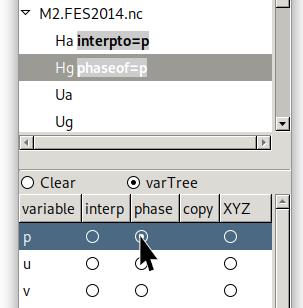
Setup for amplitude/phase complex variables:
Primary menu → [file name] → [amplitude variable], then Secondary menu → p → interp
Primary menu → [file name] → [phase variable], then Secondary menu → p → phase
Setup for real/imaginary complex variables:
Primary menu → formulaAndIso → p = re + 1j*im, j refers to the imaginary unit ( j² = -1 ).
Primary menu → [file name] → [real variable], then Secondary menu → re → interp
Primary menu → [file name] → [imaginary variable], then Secondary menu → im → interp
Isophases:
Primary menu → formulaAndIso → pG = -arg(p)*r2d
Select pG
View window → display → Select formula variable settings… [F12]
isovalues → -180 *30 180 → Apply
Tidal ellipses:
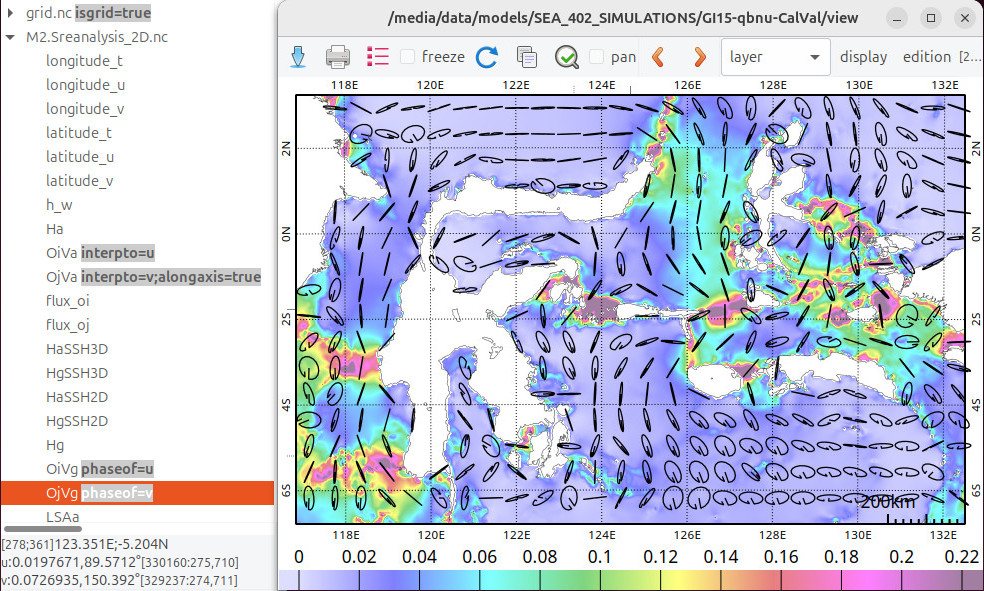
By setting complex velocities on u and v the arrows will become ellipses and the colored field will refers to the amplitude of the velocity field.
Primary menu → [file name] :
[U amplitude variable], then Secondary menu → u → interp
[U phase variable], then Secondary menu → u → phase
[V amplitude variable], then Secondary menu → v → interp
[V phase variable], then Secondary menu → v → phase
TIPS: When manipulated heavy files, check the “freeze” box in the View window before setting all the variable, then uncheck it to apply all the changes at once