Display multiple files at once
Basic method
Some datatset need to plot multiple files at once in order to get a synoptic view of an area.
Primary menu → formulatAndIso, then Secondary menu → p = a or b
Primary menu → [file1] → [variable], then Secondary menu → a → interp
Primary menu → [file2] → [variable], then Secondary menu → b → interp
Time frames over multiple files
If model outputs only contain one frame (as for SYMPHONIE), move from one file to another:
Open all the files you need (on the open window, select all the files you want and confirm)
Set up the variable you want on one file
View window → display → scripts → next file [J] / previous file [K]
Complex example for SWOT tracks
The following example use an more advance method to automaticaaly plot all the ascending or descending tracks of SWOT for a cycle and display them next to each other. To do so, we will need 2 files, one basic POCViP script and a more complex bash script that will build a dedicated POCViP script for each cycle and run it.
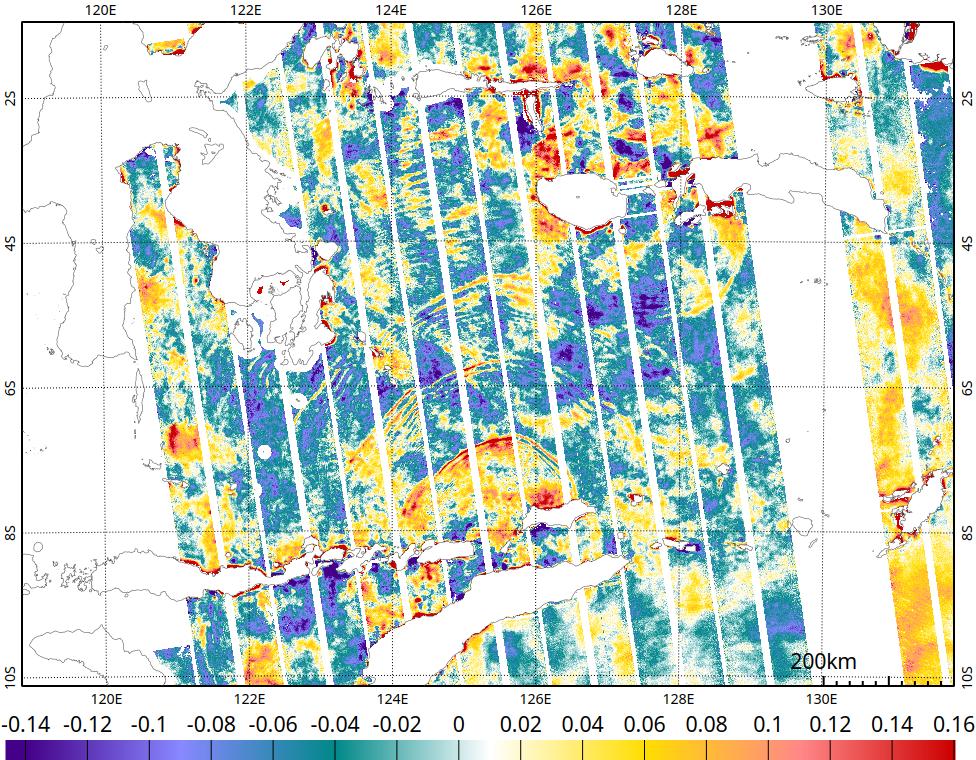
1. Setup appearance of the view (multiple_tracks.pocvip)
#set isolines
selectFile formulaAndIso/
selectVar p
setStatus isovalues{};flat=0.0;isolines{line{width=0.5;display="false";};}

#set the colormap as Constrasted Blue-Red
--palette colors={-3 #408 -2 #88f -1 #088 0 #fff 1 #fd0 2 #f88 3 #c00}

#set the projection
setView fi=0; la=-5.562;lo=125.335;zo=72.4060107; li=0
2a. Bash script to run POCViP in interactive mode
#/usr/bin

repo='/ctoh/share/data/alti_products/SWOT_Ocean/L3_KaRIn/v3_0/Expert_BandaSea_science/'
output_dir = $PWD/cycles
variable=ssha_unfiltered

#Set the wanted cycle and tracks
cycle="010"
odd=0  #0 for odd tracks (descending) and 1 for even tracks (ascending)

mkdir $output_dir

if [ $odd == 1 ];
    then tracks="ascending"
    else tracks="descending"
fi

echo "#######################" > tmp.pocvip
formula="p ="
n=0

echo "Add files to the list:"
for fichier in `cd $repo/cycle_$cycle/ ; ls * ; cd -` ; do
    if [[ "$fichier" =~ _([0-9]{3})_([0-9]{3})_ ]]; then
        c="${BASH_REMATCH[1]}"
        t="${BASH_REMATCH[2]}"

        # Verify the cycle and the track
        if [[ "$c" == "$cycle" ]] && [ $((10#$t % 2)) -eq $odd ]; then
            echo $fichier
            ((n = n + 1))

            #append the formula
            if [ $n -eq 1 ];then
                formula="$formula a$n"
            else
                formula="$formula or a$n"
            fi

            #append the pocvip script file with the attribution of all variable to plot
            echo "selectFile $repo/cycle_$cycle/$fichier" >> tmp.pocvip
            echo "selectVar $variable" >> tmp.pocvip
            echo "setStatus interpto=a$n" >> tmp.pocvip
            echo "#######################" >> tmp.pocvip

        fi
    fi
done

#merge appareance script with the script with all the tracks to plot
echo "#######################" > multiple_tracks.pocvip
echo "selectFile formulaAndIso/" >> multiple_tracks.pocvip
echo "setStatus $formula" >> multiple_tracks.pocvip
cat tmp.pocvip >> multiple_tracks.pocvip
echo "#######################" >> multiple_tracks.pocvip
cat multiple_tracks.pocvip.bckp >> multiple_tracks.pocvip

### run POCViP in interactive view
    pocvip . multiple_tracks.pocvip
2b. Bash script to run POCViP recursively on all cycles
#/usr/bin

repo='/ctoh/share/data/alti_products/SWOT_Ocean/L3_KaRIn/v3_0/Expert_BandaSea_science/'
output_dir = $PWD/cycles
rootname=”Banda-”
variable=ssha_unfiltered

mkdir $output_dir

#loop on the ascending/descending trackes
for odd in "0" "1" ; do

    if [ $odd == 1 ];
        then tracks="ascending"
        else tracks="descending"
    fi

    #loop on the cycles
    for cycle in {001..032} ; do
        echo "#######################" > tmp.pocvip
        formula="p ="
        n=0

        echo "Add files to the list:"
        for fichier in `cd $repo/cycle_$cycle/ ; ls * ; cd -` ; do
            if [[ "$fichier" =~ _([0-9]{3})_([0-9]{3})_ ]]; then
                c="${BASH_REMATCH[1]}"
                t="${BASH_REMATCH[2]}"

                # Verify the cycle and the track
                if [[ "$c" == "$cycle" ]] && [ $((10#$t % 2)) -eq $odd ]; then
                    echo $fichier
                    ((n = n + 1))

                    #append the formula
                    if [ $n -eq 1 ];then
                        formula="$formula a$n"
                    else
                        formula="$formula or a$n"
                    fi

                    #append the pocvip script file with the attribution of all variable to plot
                    echo "selectFile $repo/cycle_$cycle/$fichier" >> tmp.pocvip
                    echo "selectVar $variable" >> tmp.pocvip
                    echo "setStatus interpto=a$n" >> tmp.pocvip
                    echo "#######################" >> tmp.pocvip

                fi
            fi
        done

        #merge appareance script with the script with all the tracks to plot
        echo "#######################" > multiple_tracks.pocvip
        echo "selectFile formulaAndIso/" >> multiple_tracks.pocvip
        echo "setStatus $formula" >> multiple_tracks.pocvip
        cat tmp.pocvip >> multiple_tracks.pocvip
        echo "#######################" >> multiple_tracks.pocvip
        cat multiple_tracks.pocvip.bckp >> multiple_tracks.pocvip

         ### for recursive plot of the each cycle
         echo "#######################" >> multiple_tracks.pocvip
         echo "renameView $output_dir/$rootname\cycle$cycle-$tracks.png" >> multiple_tracks.pocvip
         echo "printView 976 760" >> multiple_tracks.pocvip

         # run POCViP without interface (-x) process the script file (.) and quit afterward (-q)
         pocvip -x . multiple_tracks.pocvip -q
     done
 done