Vector Variables
Vector fields refer to a coordinate vector \((\mathbf{u}, \mathbf{v})\).
Steps to Display Vectors
Primary menu → [file name] →
uo, then Secondary menu →u→interp.Primary menu → [file name] →
vo, then Secondary menu →v→interp.
Behavior with a Variable \(p\) Assigned
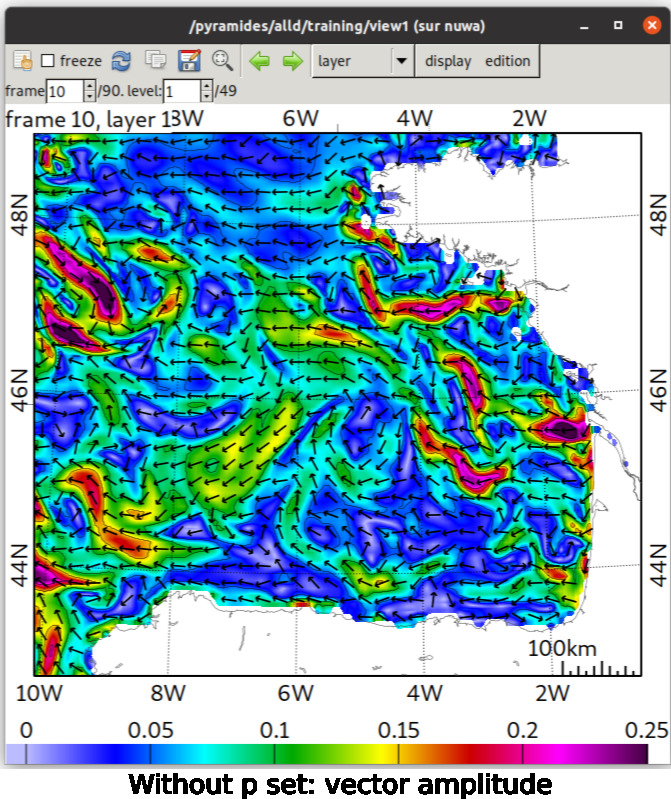
If \(p\) is not assigned:
The colorbar will reflect the vector norm: \(p = \sqrt{u^2 + v^2}\).
The arrow size will be fixed.
The colorbar range and isolines are controlled by \(u\).
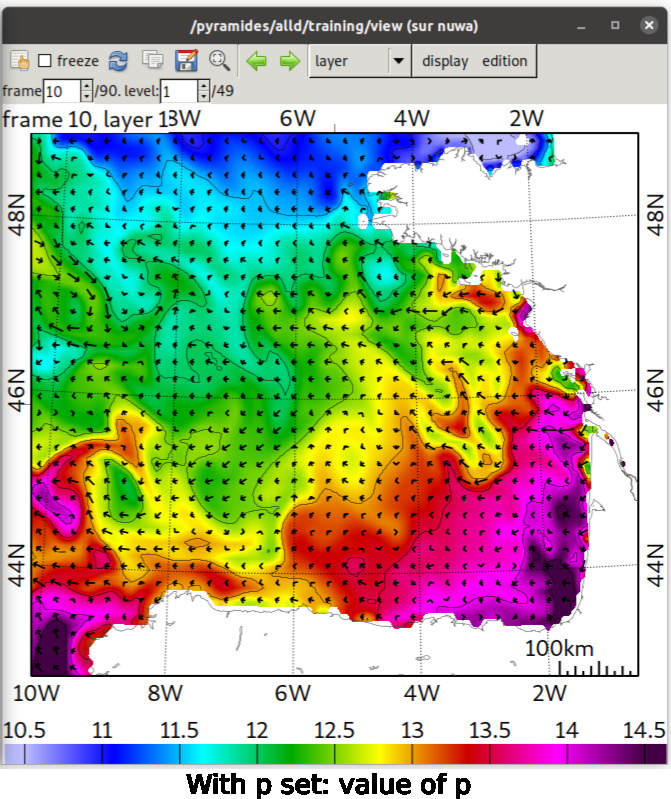
If another variable is assigned to \(p\):
The colorbar will reflect the value of **\(p\).
The arrow size will reflect the amplitude of the vector, i.e.: \(V = \sqrt{u^2 + v^2}\).
The colorbar range and isolines are thus controlled by \(p\).
Visual Examples
Without \(p\) Defined: Vector Amplitude
With \(p\) Defined: Value of \(p\)
Clearing the Assignment of \(p\) (or \(u\), \(v\))
To clear the assignment of a variable:
Primary menu → [file name] → [assigned variable], then Secondary menu →
Clear.